


Today, you're going to learn how to create a basic WordPress website post for our e-learning sandpit at klearning.co.za. You must be able to sign into the WordPress backend. (klearning.co.za/wp-login)
Your brief is to create a blog post where you pick an interesting topic of your choice—something your teachers and fellow ITEs, basically everybody, can learn as a quick e-tip or e-strategy. The hashtag we will be using is #etips.
Skills or criteria:
- Create a new post.
- Insert a heading. It must be catchy.
- Insert a picture demonstrating or relating to the topic. There are two ways to do this:
- Copy the picture and paste it directly into a text box.
- Add it to your media library first or insert an image block
- Create a context text block explaining what the tip is about.
- Insert a video how-to by embedding it from YouTube, TikTok, or wherever.
- Give the steps in point form. Use a list block to explain, step by step, how to do it.
- Insert and right-align pictures to further clarify the concept
- How to link/change text to hyperlinks.
- End with a heading and text: "How can you use this in your lesson or classroom?" Then explain in a text box.
- Add post info. This is very important:
- On the right-hand side, choose to publish immediately.
- Choose your category.
- Add a tag: e-tip, how-to, tutorial, quick.
- Add your post feature picture. Very important.
- Publish your post.
- Go and comment on your fellow ITEs' posts.
Let's break it down into steps:
How to add an image into your blog post
- Copy (Ctrl C) and Paste (Ctrl V) the image into the block (Easiest)
- Another way:
How to embed a video from YouTube or TikTok
- Find a relevant video (preferrably not longer than 5 mins)
- Open a WP block with + (on side of or between blocks)
- Search for and select Youtube embed
- Copy the url to the Youtube video;
- In your WP block, insert the link and click on embed
- Preview- Jaribaaaaa!!!
- See this article on different ways to do it
How to hyperlink text to another page or article elsewhere on the Internet.
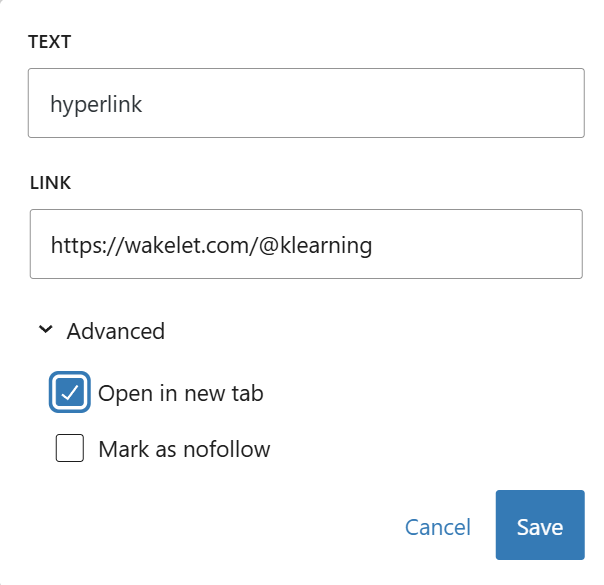
- Copy the url (web address) that you want to link to
- Highlight the text in your post that you want to hyperlink.
- Right-click on the highlight and paste the copied link.
- Click on the Edit pen and choose Open in new tab--> Save
Assessment
This will be evaluated according to a scoring sheet—whether you have demonstrated all the points above. It will also be evaluated on its relevance and interest, as well as how easy it is to read. Points will be deducted if it is clearly an AI-generated post. You are welcome to use AI, but please make sure it sounds like your own voice and takes your teacher's context into consideration.

Some rules:
- Only one person can work on their post at a time!
- Don't leave your post standing (save as a draft and come back to it)
- Make sure that your pictures are not too big.
- Don't just copy and paste AI - review and make real (RR)
- Save the draft constantly.
- Always do the summary/settings section and add a feature image.
Good luck.
Resources:
- Rubric and image
- How to add an image to WordPress:
- Video how to create a WordPress blogpost
- How to embed videos into a WordPress blogpost: See article
Recording of the session:
I would love to do a powerpoint/canva workshop
I would love to do a powerpoint/canva workshop
Thank you for joining me. Please leave a comment on what you are thinking about doing as a blog post
How to use shortcuts efficiently.
Thank you for taking the time to do this with us Maggie, am looking forward to creating my own blogpost and implementing all this and keep growing in creating my own blogpost
Thank you mamma mags ,i am thinking about diong a workshop on internet saftey tips for teachers and becoming a great facilitator .
For my blog post, I’m thinking about writing about productivity and time management for students. I want to share practical tips on staying organized, avoiding procrastination, and balancing school with personal life. I’ll also include strategies that have worked for me and explain why managing time effectively is important for success.
Formative
Formative allows you to digitize your existing paper worksheets so you can watch students draw or type their answers in real-time, giving you the power to correct mistakes the moment they happen instead of waiting to mark books at home