


In today’s fast-paced digital world, education is no longer limited to the four walls of a classroom. True learning happens when teachers, learners, and parents are connected, informed, and engaged.
This is where ClassDojo stands out — not just as a behaviour management tool, but as a mature, communication-driven platform that strengthens relationships and enhances learning across the entire school community.
Chaos to Connection: How ClassDojo is Changing Our Classrooms?
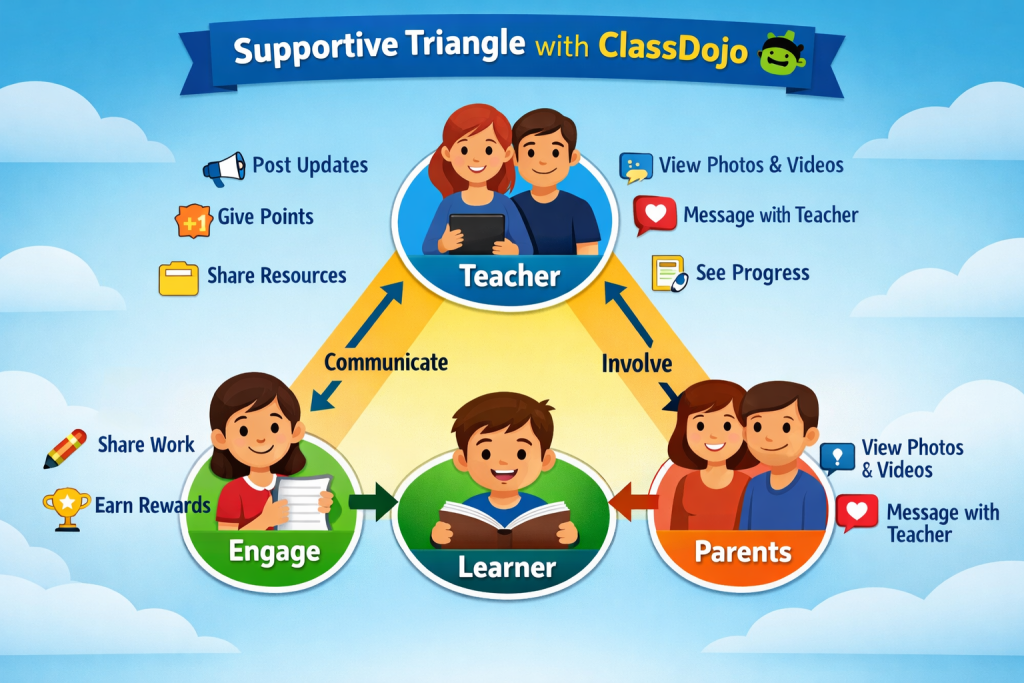
ClassDojo is a digital platform that allows teachers, learners, and parents to interact in a safe, structured, and engaging online space.
Think of it as a private social network for your classroom, where:
- Teachers share updates, resources, and feedback
- Learners showcase their work and reflect on their learning
- Parents stay informed and actively involved
It moves beyond simple classroom management and becomes a hub for communication, collaboration, and growth.
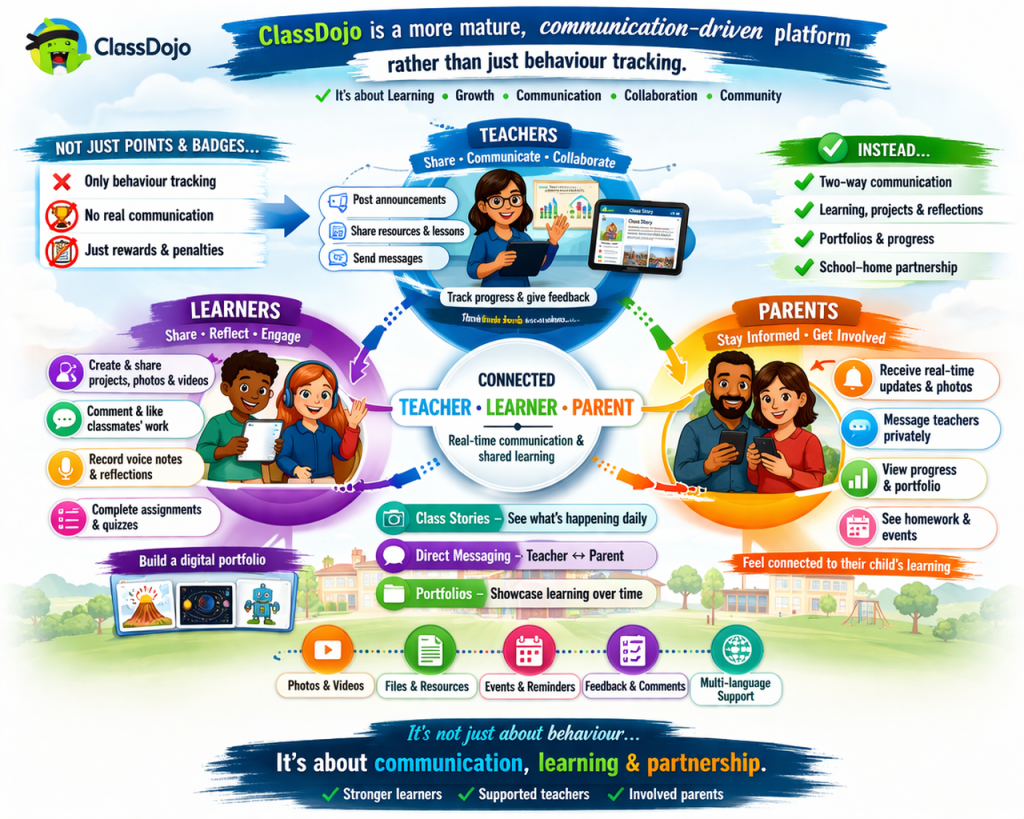
From Behaviour Tracking to Meaningful Communication
Traditionally, ClassDojo was known for its points system — rewarding positive behaviour in the classroom.
However, it has evolved into something far more powerful.
Today, it supports:
- Two-way communication between teachers and parents
- Real-time classroom updates through photos and videos
- Learner portfolios that showcase growth over time
- Collaboration and engagement beyond the classroom
The focus is no longer just on behaviour — it’s about building a connected learning community.
Primary School: Building Confidence and Connection
In primary schools, ClassDojo creates a positive and motivating environment for young learners.
For Learners:
- Earn recognition for effort and participation
- Share pictures, voice notes, and simple tasks
- Build confidence through positive feedback
For Teachers:
- Encourage positive behaviour in a supportive way
- Instantly communicate with parents
- Share classroom moments and achievements
For Parents:
- See what their child is learning daily
- Feel connected to the classroom
- Celebrate milestones and progress
The result: A happy, engaged, and supported learner.
High School: A More Mature, Communication-Driven Approach
At high school level, ClassDojo shifts from rewards to responsibility, communication, and reflection.
For Learners:
- Build a digital portfolio of their work
- Reflect on learning and receive feedback
- Engage in meaningful classroom discussions
For Teachers:
- Share academic resources and updates
- Provide feedback efficiently
- Track engagement and participation
For Parents:
- Stay informed about academic progress
- Communicate easily with teachers
- Support their child’s learning journey
The result: A more independent, accountable, and connected learner.
Why ClassDojo is a Game-Changer for Schools
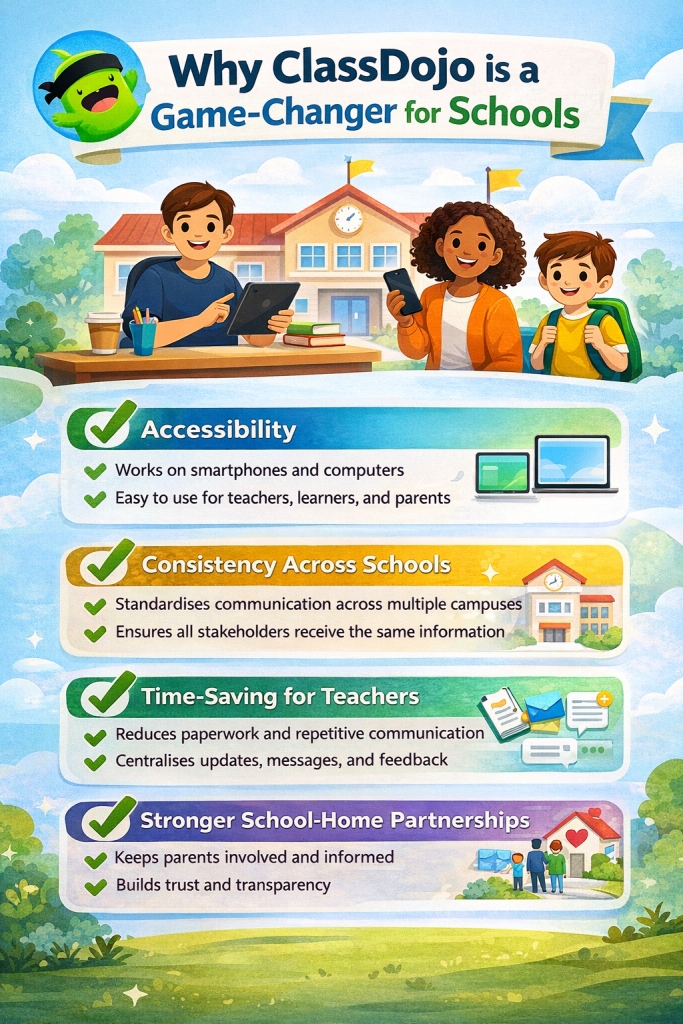
For schools with diverse needs — including limited devices or shared computer labs — ClassDojo offers a simple yet powerful solution.
Accessibility
- Works on smartphones and computers
- Easy to use for teachers, learners, and parents
Consistency Across Schools
- Standardises communication across multiple campuses
- Ensures all stakeholders receive the same information
Time-Saving for Teachers
- Reduces paperwork and repetitive communication
- Centralises updates, messages, and feedback
Stronger School-Home Partnerships
- Keeps parents involved and informed
- Builds trust and transparency
Making Your Classroom More Engaging with ClassDojo
ClassDojo allows you to bring learning to life through multimedia and interaction.
You can:
- Share photos of class activities
- Upload lesson videos
- Record voice notes for feedback
- Encourage learners to post reflections
How to Set Up & Log In to ClassDojo
Getting started with ClassDojo is quick and simple. Follow these steps to create your account, set up your class, and start connecting with learners and parents.
Step 1: Sign Up for ClassDojo
- Go to the website: 👉 https://www.classdojo.com
- Click “Sign Up”
- Choose your role:
- Teacher
- Parent
- Student
- Enter your:
- Name
- Email address
- Password
- Click “Create Account”
Step 2: Log In to Your Account
- Go to https://www.classdojo.com
- Click “Log In”
- Enter your:
- Password
- Click “Log In”
Step 3: Set Up Your Class (For Teachers)
Once logged in:
- Click “+ New Class”
- Enter:
- Class name (e.g., Grade 6 Maths)
- Grade level
- Choose or customise avatars
- Click “Create Class”
Your classroom is now ready!
Step 4: Add Learners
You can add learners in two ways:
Option 1: Add Manually
- Click “Add Students”
- Type each learner’s name
Option 2: Import a List
- Copy and paste names from a class list
Each learner will automatically get an avatar
Step 5: Invite Parents
- Click “Invite Parents”
- Choose how to invite:
- SMS
- Printed invitation codes
Parents join using a unique code linked to their child
Step 6: Start Communicating
Now you can start using ClassDojo features:
- Post updates on Class Story
- Send messages to parents
- Give feedback or points
- Share learner work and portfolios
Tips for First-Time Users
✔ Start small — post one update per day
✔ Show learners how to use it responsibly
✔ Encourage parents to join early
✔ Use it consistently for best results
Common Mistakes to Avoid
❌ Adding too many features at once
❌ Not inviting parents immediately
❌ Using it only for behaviour (miss the full potential!)
Final Thoughts
ClassDojo is no longer just a behaviour management tool — it is a powerful communication platform that brings teachers, learners, and parents together in meaningful ways.
When used effectively, it can transform classrooms into connected, collaborative, and engaging learning spaces.