
Using Mind-mapping for teaching and learning in a tech infused classroom
What is a mind-map?
A mind map is a diagram used to visually outline information. It is often created around a single word or text, placed in the center, to which associated ideas, words and concepts are added. Major categories radiate from a central node, and lesser categories are sub-branches of larger branches. Categories can represent words, ideas, tasks, or other items related to a central key word or idea.
(Source: http://en.wikipedia.org/wiki/Mind_map)
How can we use mind-mapping in the classroom?
Read some of the articles that will give you great examples and ideas about how to use mindmapping in the classroom
Why should we use mind-mapping in the classroom?

Download the workshop material:
Click on the picture...
Activity 1: Topic Happiness

Objective of activity?
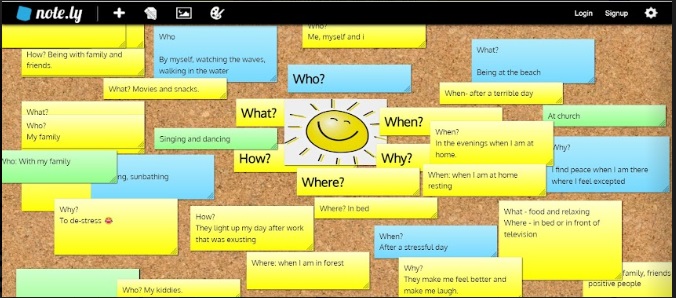
This is icebreaker activity that also introduces the basic concepts of mind-mapping. Asking participants to shout out the answers and then getting them to add their answers individually to the online notepad highlights the difference in how technology can change the tone of a lesson. (Group (loud) --> learner centered (quiet))
You can also bring in the idea of rapid brainstorming, which is a good way to introduce/summarise any classroom topic.
Technology used?
- Whatsapp
Make sure all participants/learners are in the main group. This tool is accessible to most participants. You can share the online links to material easily and they can submit evidence instantaneously to be projected on the main screen.
Note.ly
Electronic pinboard. Learners do not have to sign in or register . The presenter screen has to be refreshed to show everybody's stickies. The ideas can then be grouped into themes around the central them "happiness".
- Google slides
Makes it possible to work collaboratively online in a group. You will need internet access. Can be problematic on smaller cellphone screens.
- PowerPoint slides
Use when in an offline environment. Most laboratory computers have MS PowerPoint installed. Using slides to create mind-maps allows for visual elements, like pictures, lines and text boxes to be added to map.
- Lots of different mind-mapping tools
See our collaborative list of mind-mapping tools in our tech tab at the top.
Debrief
You can always use the WHAT -- WHY -- HOW-- WHERE -- WHEN -- WHO to kick off the brainstorming for a mind-map!
Activity 2:

Objective of activity?
In this activity the topic is "Lesson planning". We therefore use a mind-mapping app and mind mapping strategies (What-Why...) to explore what is a lesson plan and what will make a good lesson plan. You can do a guided map or let the groups design and brainstorm their own (depending on time limits) to share via Whatsapp (screenshot). A great idea is to use a collaborative online mind-map and give each group a "branch" to complete.

Technology used?
- CMAP
CMAP is an offline open source versatile mind-mapping app/software that creates professional mind-maps and is easy to use.
- Any other mind-mapping software can be used. play around to see what works best for you. See list under technology
Activity 3: Create a WOW lesson plan

This activity is designed to help you think about lesson planning using mind-mapping and brainstorming. You can adapt the more formal lesson plan to suit your needs and style.
Proof of implementation;
To be able to earn your implementation points and strategy badge, you need to provide proof that you have used the strategy with embedded technology, in your classroom, with your learners.

Feel free to add some lesson plan ideas to the discussion area
- For lots of examples of how to use mind-maps with your learners see here
Complete the lesson plan idea form (10 points)
What is next?
By working through each of the section tabs at the top, you will become more confident in:
-- Applying the strategy in your own lessons
-- Choosing and using appropriate tech to enhance your lesson
-- Making sure you incorporate all 4C's into your lesson structure
-- Earning 50 Points for yourself and your school by Implementing all the above
-- Becoming part of the ongoing discussion about how to use this strategy and various tech tools below. Just click on Leave a reply below (1 comment*=5 points)

Module 3 discussion:
Make sure that you work through the course material to get some inspiration for implementation of Mind maps with your learners. Don't forget to become part of the discussion below (5 points for every lesson plan idea and useful comment! #the-game-is-real )
Discussion question:
If you think about what lesson topics you will be teaching in the upcoming weeks, how would you incorporate mind-mapping into your lesson plan? (Just click on Leave a Reply and complete your name and surname, email address and your school under "Website" and enter your response. You can also reply to others by clicking on the Reply link).
If you think about what lesson topics you will be teaching in the upcoming weeks, how would you incorporate mind-mapping into your lesson plan?
I’ll use mind mapping to supply learners with an oversight of the work planned for the term.
Great idea!!
I will be teaching insects
First testing their pre – knowledge about insects by asking using the mind mapping strategy
Looking forward to hearing your feedback!!
Need some help? Leave your topic that you will be teaching (and grade) and we will come up with some starter ideas for you. (Let’s help each other to get going!
I will use mind- mapping to show what I have done and show what I will do
Looking forward to see how you are going to do that! Jaribaaaaa!
I can use mind mapping with advertisements that we do in Afrikaans hone language. Awesome way to let the learners structure their minds on what product they want to advertise, who do they want to advertise it to, where are their product available etc…
Love it! Can’t wait to see the learner’s mind-maps!
So awesome cannot wait !!!!!
Fraaisig Primary
Mind-Mapping definitions and differences between states of Matter. Concordia Primary.
Looking forward to seeing the mindmaps
I will show a picture of a bee
Butterfly and a sprinkaan
Askiing questions;mind mapping for prior knowledge
What is it
What do they know about it
Where do you find it
What value does it have for us
Fabulous- don’t forget to send me the mindmaps that the kids have created – also let me know what tech you have used (e.g. projector, laptop, cell phones, mindmapping tool….)